

In this article we will look at how to expose a RFC as a Web service in SAP PI/PO. Using SOAP to RFC synchronous interface we would be exposed a RFC as a web service.
Most commonly researched topics under third-party system integration with SAP is how to use RFCs and web services to expose SAP APIs. There are lot of confusion under exposing web services due to different third-party platforms, authentication, connection issues and different PI versions etc.
There are several ways third party applications you can access RFCs.
-
Directly access RFC using SAP credentials.
I have previously written a article on how to access a RFC using .NET front-end.
-
Exposing RFC as a web service using transaction SE37.
This can be done using SE37>Utilities>Create web service option.
-
Exposing RFC as a web-service using SAP Process Integration (PI/PO).
Configuration Steps How to Expose RFC as a Web Service using PI/PO.
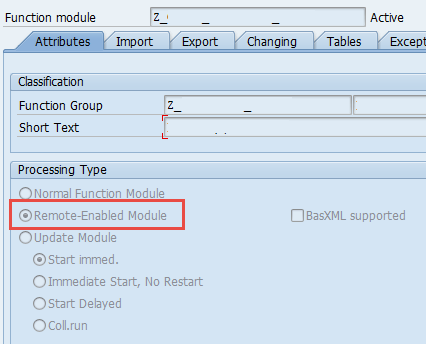
1. Make sure your function module or the API is “Remote enabled”. – SE37
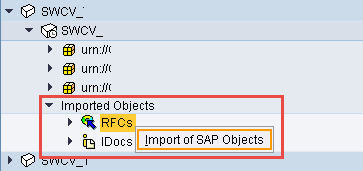
2. Import RFC to SAP PI.
Right click on RFC under imported objects under software component and provide application server/system number/user credential. Then find the RFC from the list.
3. Create input, output data types and message types which correspond to SOAP input and output data formats.
SOAP response data/message type.
4. Create message mapping for SOAP request to RFC input.

5. Create message mapping for RFC output to SOAP response.

6. Create outbound service interface.

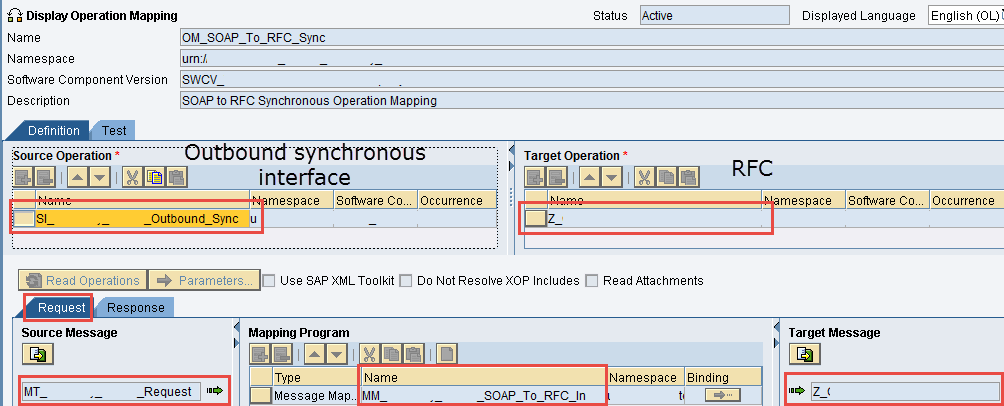
7. Create operation mapping.
Configure Operation Mapping for request and response.

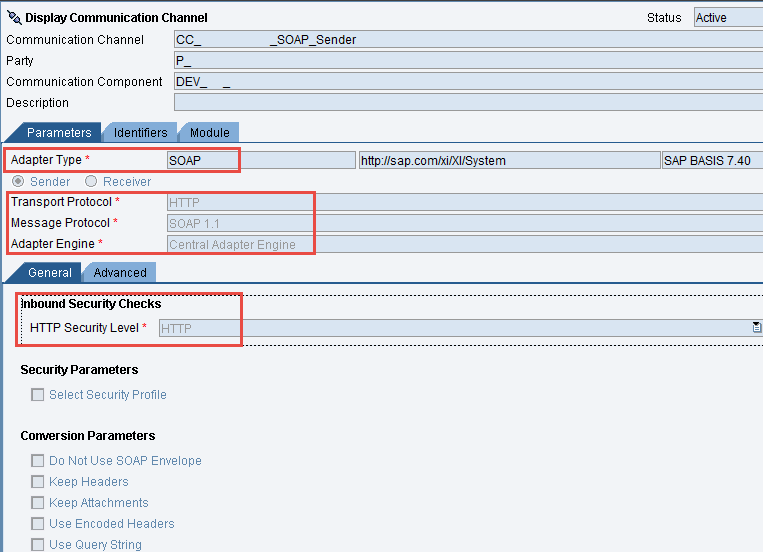
8. Create sender SOAP communication channel.
9. Create RFC receiver communication channel.

10. Create integration scenario.
11. Publish the interface under service registry.
if you have any questions on any of the steps discussed how to expose a RFC as a web service, please leave a comment.